Basic Knowledge > Introduction to the Operation > Menu Options during Outgoing Calls

Menu Options during Outgoing Calls
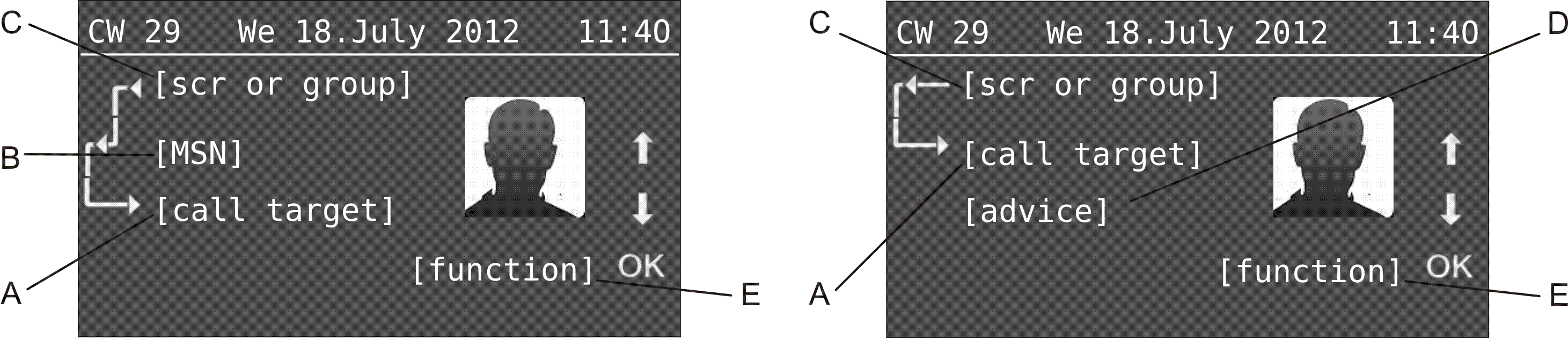
The following information is displayed during an outgoing call:
A
Note:
If the phone number dialled has been assigned a name in the telephone book of the system telephone, this will be displayed as soon as the telephone detects the phone number. The phone number is simply overwritten by the name.
If a contact image has been stored on the SD card and is assigned to a contact, it will be displayed (see chapter Telephone Book and Lists > Telephone Book > Adding contact images to the telephone book). If this is not the case, an Avatar image printed here will be displayed.
If less than nine digits have been entered, they are displayed in a larger font to facilitate legibility (during dialling/during the call). If the phone number dialled has been assigned a name in the telephone book of the system telephone, and this name comprises fewer than nine characters, this name is also displayed in a larger font.
 
B
Important: Only available for operation on the PBXs COMpact 3000 analogue/ISDN/VoIP, COMpact 5010 VoIP, COMpact 5020 VoIP, COMpact 4000, COMpact 5000/R, COMpact 5200/R, COMpact 5500R and COMmander 6000/R/RX.
C
D
E
Your system telephone shows possible functions during an outgoing call in the lower line of the display.
Tap on and to scroll through the various options.
Tap on OK to initiate the function currently displayed.

COMfortel 2600 - Firmware V2.2 - COMfortel Set V3.16 - Advanced Information V10 02/2019